
Managing modules
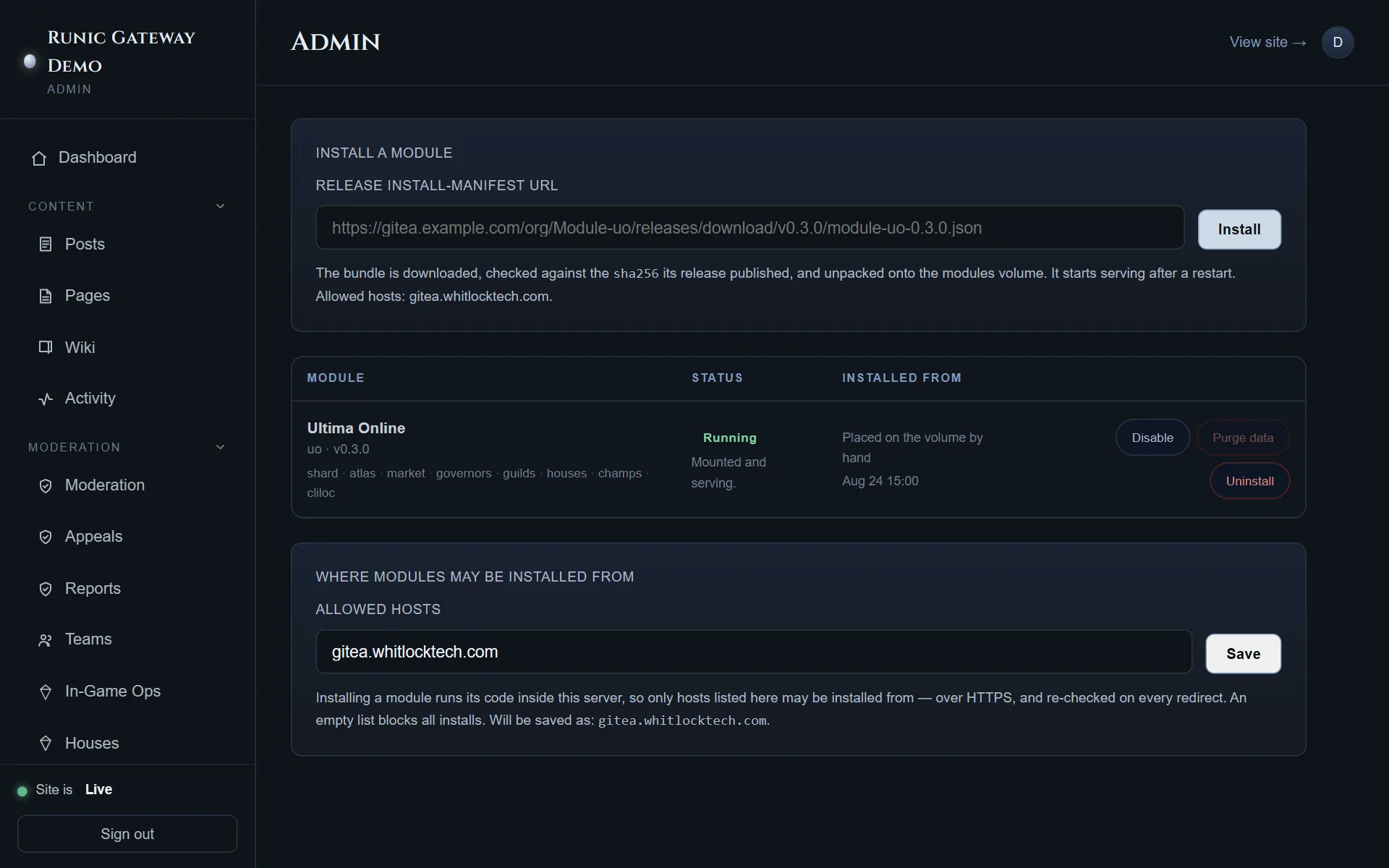
Installing your first module is Getting started. This is what the screen means afterwards.
The five states
Section titled “The five states”installed → enabled → started, with disabled and startup_failed as recoverable
states.
| State | Means |
|---|---|
| Installed | Files are on the volume; it mounts at the next restart |
| Enabled | Allowed to run, and about to be loaded. Every boot resets each non-disabled module to this, then records the outcome |
| Started | Running: routes mounted, schema applied |
| Disabled | An operator switched it off. Its routes answer not found |
| Startup failed | It tried and could not. The site came up without it |
A module that fails to load never takes the site down. Failure is caught across the whole lifecycle — require, schema, routes, registration, boot hook — and the site starts with that module’s routes and navigation absent, and the reason recorded on this screen.
Two consequences of how boots work:
- A failed module is retried on every restart. Fix the underlying cause and restart; you do not need to touch the panel. A deterministically broken module re-records its failure each boot, which is the honest thing for it to do.
- Disabled is the only state a boot leaves alone. Disabling is an operator’s decision rather than an outcome, so it survives restarts untouched.
Upgrading
Section titled “Upgrading”Paste the new release’s install-manifest URL and press Install. The bundle is verified
against its sha256, unpacked over the old one, and takes effect at the restart.
An upgrade deliberately leaves the state alone: upgrading an enabled module must not silently switch it off, and re-installing a disabled one must not silently switch it on.
Disable, uninstall, purge
Section titled “Disable, uninstall, purge”Three different actions, in increasing order of destruction.
Disable flips the row and dispatches that module’s shutdown hook, so it actually stops — releases its sockets, closes its streams — rather than merely becoming unreachable. Enable is deliberately not the mirror image: there is no boot hook re-dispatch, so enabling offers a restart.
Uninstall is non-destructive by default: the row goes to disabled, the directory is
removed, and the module’s tables and data are retained.
Purge runs the module’s own purge.sql and destroys its data. It is never implied by
an uninstall, and it is offered in two places — as a standalone action on an installed
module, and as an opt-in checkbox in the uninstall dialog.
Where modules may be installed from
Section titled “Where modules may be installed from”The allowlist at the bottom of the screen. Installing a module runs its code inside your server, so only listed hosts are permitted, over HTTPS, re-checked on every redirect. An empty list forbids every install.
MODULE_SOURCE_HOSTS seeds this list on a site’s first boot and is ignored afterwards —
the setting is authoritative, so a redeploy cannot silently undo your choice.
The declarative path
Section titled “The declarative path”MODULES in .env declares the set this deployment runs, resolved at every container
start, each entry <id>@<version>=<install manifest URL>.
The division of ownership is the thing to remember: the variable owns what is on the volume; the panel owns whether a module runs. Uninstall a declared module from the panel and its files come back at the next start — disabled.
A module already unpacked at the declared version is a no-op that makes no network call at all, so a restart with no route to the internet comes up unchanged. A version that cannot be fetched is logged, shown on this screen, and never stops the site starting.
Placing one by hand
Section titled “Placing one by hand”Unpacking a module tarball into ./modules/<id>/ and restarting is a supported install —
it is why that path is a bind mount rather than a named volume. The row it produces has no
provenance columns, because nothing downloaded it.